Tsallake zuwa abun ciki
Kayan aikin sarrafa kansu, isarwa a ko’ina cikin duniya
Tsallaka zuwa bayanin kaya
1 na 3

SKU:T8310

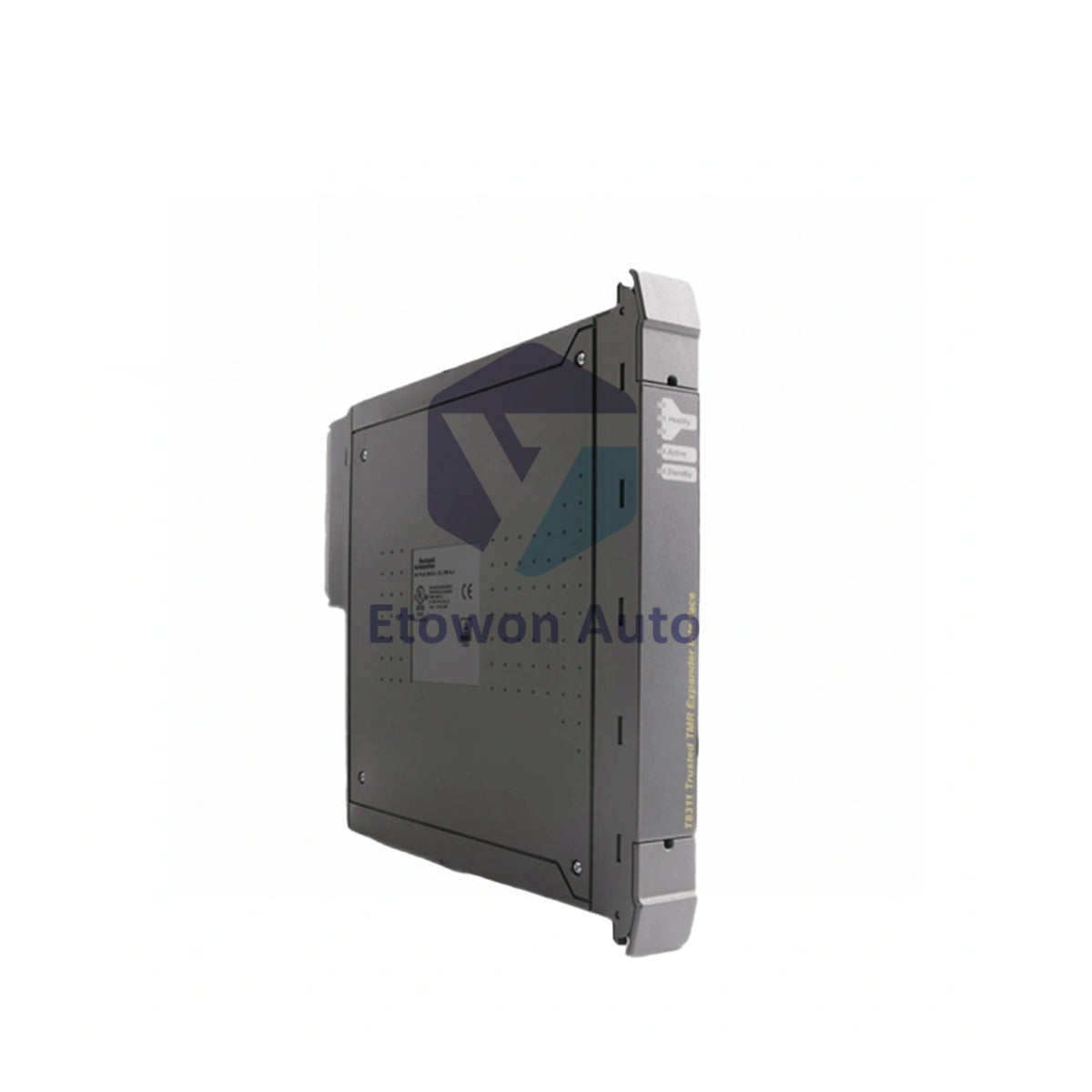
ICS Triplex T8310 Expander Processor 250Mbps 45W

Ragowar raka'a 5 kaɗai
  • Manufacturer: ICS Triplex

  • Product No.: T8310

  • Product Type: Processor Module

  • Product Origin: USA

  • Payment:T/T, Western Union

  • Weight: 1330g

  • Shipping port: Xiamen

  • Warranty: 12 months

Dokar Mayar da Kaya na Kwanaki 30 · Garantin Watanni 12
  • Isarwa Cikin Gaggawa
  • Tallafi na awa 24 a rana, kwana 7 a mako
  • Tabbacin Inganci

Bayani

Product Overview

The ICS Triplex T8310 is the expander processor module that resides in the two leftmost processor slots of the expander chassis. It provides the critical interface between the expander and controller chassis, utilising fault‑tolerant HIFT TMR architecture. With a 250 Mbps data transfer rate and comprehensive diagnostics, the T8310 ensures seamless expansion for large‑scale safety systems requiring SIL 3 compliance.

Core Advantages

Fault‑Tolerant TMR Architecture

Built on ICS Triplex's High Integrity Fault Tolerant (HIFT) platform. Fully triplicated with 2‑out‑of‑3 voting ensures no single point of failure compromises system integrity.

High‑Speed Data Transfer

Operates at 250 Mbps via TC‑301 hot link cable and T8312 expander interface adapter, delivering low‑latency communication between controller and expander chassis.

Comprehensive Diagnostics & Redundancy

Rapid fault identification with slice health LEDs (green/red per channel). Supports automatic and manual repair strategies with standby module configuration for maximum uptime.

Specifications

Parameter Value
Supply Voltage 20–32 Vdc
Power Consumption 45 W max
Data Transfer Rate 250 Mbps
Architecture HIFT TMR (triplicated)
Chassis Position Two leftmost processor slots
Connection TC‑301 hot link cable + T8312 adapter
Power Supply Dual redundant 24V from backplane
Standby Support Auto / manual repair with standby
Diagnostics Comprehensive with LED status
Certifications ATEX, IECEx, HazLoc, Ordinary Location
Weight 1.33 kg

Installation Tips

Chassis Slot Placement

Install the T8310 in the two leftmost processor slots of the expander chassis only. Incorrect slot placement prevents proper communication with the controller.

Cable Connection

Use the TC‑301 communications cable to connect the controller and expander assemblies. Ensure the T8312 expander interface adapter is properly seated for reliable 250 Mbps operation.

Redundant Power

The module draws dual redundant 24V from the backplane. Verify both power feeds are active to maintain fault tolerance.

LED Status Monitoring

Monitor the three Healthy LEDs (one per slice) — green indicates healthy, red signals a fault. The TxRx LEDs show communication activity: green = receive, red = transmit, amber = both.

Why Choose T8310?

Enables seamless system expansion while maintaining TMR fault tolerance. The 250 Mbps data rate ensures real‑time synchronisation between controller and expander chassis. Comprehensive slice‑level diagnostics and standby support minimise downtime. Certified for hazardous areas, the T8310 is the backbone of large‑scale ICS Triplex Trusted systems in oil, gas, and power generation.

FAQs

Q1: What is the difference between Active and Standby mode on the T8310?
A1: Active mode (green LED) means the processor is currently controlling the expander chassis. Standby mode (steady green) indicates the module is ready to take over automatically if the active unit fails.

Q2: Can the T8310 operate without the T8312 adapter?
A2: No. The T8312 expander interface adapter is required to connect the TC‑301 hot link cable to the T8310. Both are essential for proper expander‑controller communication.

Q3: What does the TxRx LED off condition indicate?
A3: When all three TxRx LEDs are off, it signals no communication activity or a failure. Check the TC‑301 cable connection and verify the controller chassis is powered and operational.

Sikeli (V/f)

Vector

mai amfani da wutar AC

  • Tabbatar da ainihin samfurin, lambar ɓangare, da ƙayyadaddun bayanai kafin yin oda.
  • Tabbatar da jituwa da injin ko tsarin kula da kake amfani da su a yanzu.
  • Tuntuɓe mu ta sale@etowonauto.com ko +8617859788089 don taimakon fasaha.
  • Duba zaɓuɓɓukan isarwa, lokacin jagora, da buƙatun jigilar kaya.
  • Bi umarnin masana’anta da mafi kyawun hanyoyin aiki yayin girkawa.

Kayayyakin da ke cikin sito yawanci ana tura su a cikin wannan ranar aikin. Ga kayayyakin da ba sa cikin sito a yanzu, lokacin tura su na iya bambanta bisa ga samuwa. Ana ba da jigilar kaya zuwa ƙasashen waje, kuma ana ƙididdige kuɗin jigila bisa wurin da ake aikawa, nauyi, da kamfanin sufuri da aka zaɓa.

Ana karɓar mayar da kaya cikin kwanaki 30 bayan karɓa, muddin kayan ba a yi amfani da su ba kuma suna cikin yanayin da suka fito daga masana’anta. Kuɗin jigilar mayar da kaya nauyi ne a kan abokin ciniki. Da fatan za a tuntube mu kafin ku mayar da duk wani kaya domin samun izinin mayarwa.

Don ƙarin bayani, don Allah ku duba Manufar Jigila & Mayar da Kaya.

Duba bayanin samfur

TABBTAR DA INGANTACCEN AIKIN NA'URORI

Canza gidanka da sabbin hanyoyin na’urorin lantarki masu yawa, daga hasken wuta mai hankali zuwa inganta ayyukanka da Bently Nevada 3500 Monitoring System, wanda ke ba da sa ido a ainihin lokaci kan girgiza da yanayin na’urorin injina don hana gazawa da ƙara lokacin aiki, da na’urorin da ake sarrafa su da murya duk an ƙera su ne don sauƙaƙa rayuwa, ƙara tsaro, da ƙarfafa haɗin kai.